Hiring in a small business is usually treated like a side quest. Someone posts a job, resumes land everywhere, calendars implode, and “gut feel” does the rest. That works until it doesn’t.
This guide is for small business owners, HR leads, and hiring managers in lean teams who want a cleaner hiring process, better candidate experience, and fewer bad hires, without buying enterprise software you’ll never use.
What you’ll walk away with:
- A practical map of the hiring process (and where software actually helps)
- A clear difference between an ATS, HR software, and all-in-one hiring platforms
- The feature shortlist that matters for small teams
- How to choose based on hiring volume, integrations, and ROI
- A simple implementation plan you can run in 30 days
What small business recruitment software does (and who needs it)
Small business recruitment software is a system designed primarily for small business owners and lean teams, helping them organize their hiring process end-to-end: job posting, applicant tracking, candidate communication, interview scheduling, and basic reporting. As a recruiting platform, it offers a comprehensive solution to streamline, organize, and scale hiring processes, making it easier for small teams with limited resources to manage recruitment efficiently. Most tools center around an applicant tracking system (ATS), then add recruiting tools like job board posting, templates, automation, and integrations.
You need it if any of this is true:
- You are posting jobs more than once or twice a year and repeating the same manual steps.
- You have multiple people involved (even casually) and decisions get messy.
- You lose candidates because you respond late or forget to follow up.
- You cannot answer basic questions like “Which job board worked?” or “Where do candidates drop off?”
- You want consistency in candidate evaluation so hiring decisions are not purely opinion-driven.
- You need to align your hiring processes with hiring goals to support business growth and compliance.
Occasional hiring still benefits from structure. Even with “one active job,” the cost of one weak hire usually dwarfs the cost of basic recruiting software, especially if your process is slow and inconsistent.

The small business hiring process, mapped in 6 steps
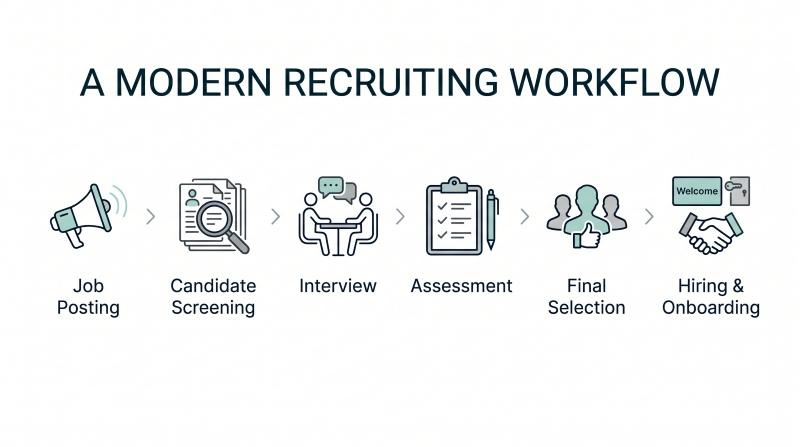
A typical hiring process in small companies looks like this:
- Define the role and requirements
- Job posting and candidate sourcing
- Screening and shortlisting
- Interviews and candidate evaluation
- Offer and acceptance
- Handoff to onboarding and HR
Where it breaks in real life:
- Job posting happens across multiple job boards with no tracking.
- Candidate data lives in email threads, spreadsheets, and someone’s memory.
- Scheduling interviews becomes a time sink.
- Evaluation is unstructured, so the “best candidates” are whoever interviewed last.
- Offers are slow and inconsistent, hurting job candidates’ experience.
- Handoff to payroll and HR systems is manual, so details get re-entered (and wrong).
Automated, timely responses from recruitment software help prevent qualified candidates from slipping away by enhancing communication with applicants.
Recruiting software reduces manual effort by automating recruitment tasks such as job postings, candidate evaluation, and onboarding, turning these steps into a repeatable workflow: structured pipeline stages, templates, reminders, permissions, and reporting tools that show where your hiring pipelines leak.
ATS vs HR software vs all-in-one hiring software
These terms get mixed constantly, so here’s the clean version.
- ATS (Applicant Tracking System): Manages job posting, applicant tracking, pipelines, interview scheduling, and candidate communication.
- HR software / HRIS: Manages employees after hire: records, time tracking, payroll integration, benefits, HR tasks, and integrated HR tools for onboarding, compliance, and background checks.
- All-in-one hiring platform: Combines ATS features with parts of HR software and onboarding; some platforms also offer real-time analytics for up-to-the-minute hiring insights.
One simple comparison table
| Category | Best for | What it usually includes | What it often lacks |
|---|---|---|---|
| ATS (recruiting software) | Teams who need better hiring fast | Job posting, applicant tracking, pipelines, scheduling interviews, basic reporting | Full payroll and HR systems, deeper employee management |
| HR software / HRIS | Teams focused on payroll and HR operations | Employee records, payroll integration, time tracking, HR tasks | Strong applicant tracking, candidate sourcing, job board distribution |
| All-in-one platform | Teams wanting “one platform” simplicity | ATS + onboarding + some unified HR | Best-in-class recruiting depth, flexibility in advanced hiring workflows |
| What to choose: |
- Choose an ATS if hiring is the pain and you already have payroll and HR systems you like.
- Choose all-in-one if you want fewer tools and your process is straightforward.
- Choose HR-first systems only if hiring is truly rare and your main need is payroll and HR systems.
Features that matter most for small teams
You do not need every “AI” checkbox. You need the features that remove friction and improve hiring decisions. An effective recruiting platform for small businesses should prioritize usability, functionality, and scalability without unnecessary complexity.
Job posting to multiple job boards
Look for:
- Posting jobs to multiple job boards and job posting sites from one place
- Basic tracking by source (which job boards send qualified candidates)
- Easy edits and reposting without duplicating work
If the tool makes job posting hard, you will not use it consistently.
Applicant tracking and hiring pipelines
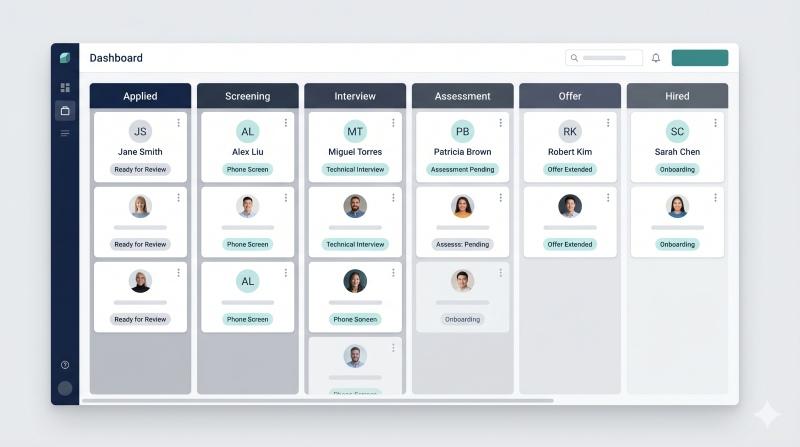
Your ATS should make the recruitment process visible:
- Clear stages (applied, screened, interview, final, offer)
- Customizable workflows without needing a consultant
- Tags, notes, and simple collaboration for hiring managers and internal teams
- Permission controls for sensitive candidate data
A good pipeline helps quickly identify bottlenecks and prevents candidates from going stale.
Screening tools and candidate evaluation
You want screening tools that reduce noise without turning hiring into a black box:
- Resume parsing is useful if it saves time and stays accurate enough
- Knockout questions can help, but keep them role-relevant
- Scorecards or rubrics for candidate evaluation so interviewers rate the same criteria
This is where structured assessment adds value. A CV shows what someone has done. It rarely shows how they behave under pressure, how they collaborate, or whether they fit the demands of the role. Tools like the OAD Survey personality assessment are designed to add structured candidate data to decisions that otherwise rely on intuition.
Design teams with data, not gut feel.
Most org-design decisions come down to role fit, leadership style, and team dynamics. OAD reads those signals from a 7-minute behavioral survey, so you can reconfigure roles and teams with evidence instead of guesswork.
Interview scheduling (calendar sync, reminders)
Interview scheduling is where small teams lose hours.
Look for:
- Self-serve scheduling interviews (candidates choose slots)
- Outlook Calendar and Google Calendar sync
- Automated reminders and rescheduling flows
- Time zone handling for global hiring
If scheduling takes “a few clicks,” it actually gets used.
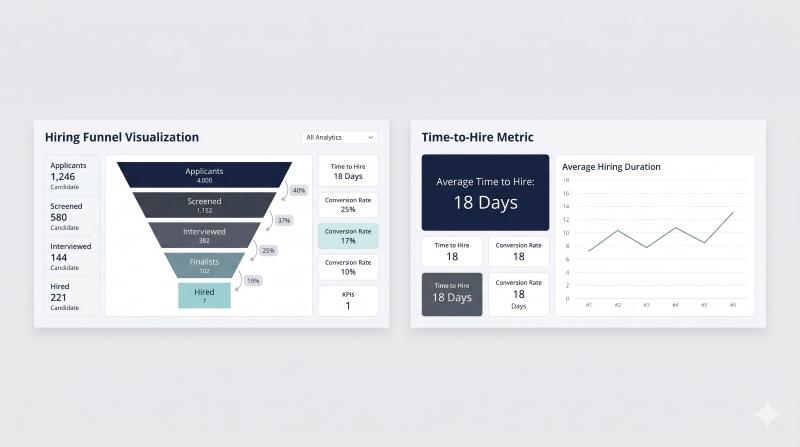
Reporting tools (time to hire, funnel, sources)
You do not need enterprise analytics. You need answers to basic questions:
- Time to hire by role
- Stage conversion (how many screened become interviews, how many interviews become offers)
- Source quality (which job boards deliver the best candidates)
- Drop-off points that hurt candidate experience
Reporting tools, especially those with real-time analytics, provide up-to-the-minute data insights and reporting for your hiring processes, while behavior fit reports that match roles to personality help ensure you are assessing not just volume but true role alignment. This helps you monitor and improve your recruitment instantly, so you stop arguing from anecdotes.
Integrations to require before you buy
Integrations are not “nice to have.” They decide whether your system becomes the system, or just another tab no one opens.
Payroll and HR systems
If you already run payroll and HR systems, require:
- Clean handoff from “hired” to onboarding
- Export or sync into employee records
- Basic onboarding workflows (even if you keep them in HR software)
If payroll integration is promised but messy, the burden lands on your HR team, and tools that give every employee secure application access and individual profiles become harder to fully leverage.
Email/calendar and existing tools
Require:
- Email sync (so candidate communication is tracked)
- Calendar integrations (Outlook Calendar and Google Calendar)
- Third party integrations with tools you already use (Slack, Teams, background checks, forms)
If the tool cannot work with your existing tools, adoption collapses.
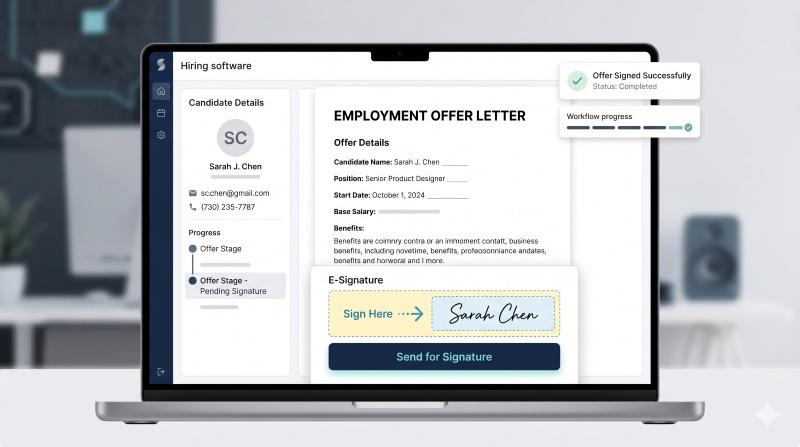
Background checks and offer letters (e-signature)
Depending on region and role, you may need:
- Integrated background checks (or at least reliable integrations) and support for assessing communication skills in interviews
- Offer letter templates
- E-signature capabilities to reduce offer-stage delays
Keep compliance global-friendly: privacy controls, retention settings, and access rules should be clear and configurable.
How to choose the best recruiting software for your hiring volume
Match the tool to how you actually hire, not how you imagine you will hire.
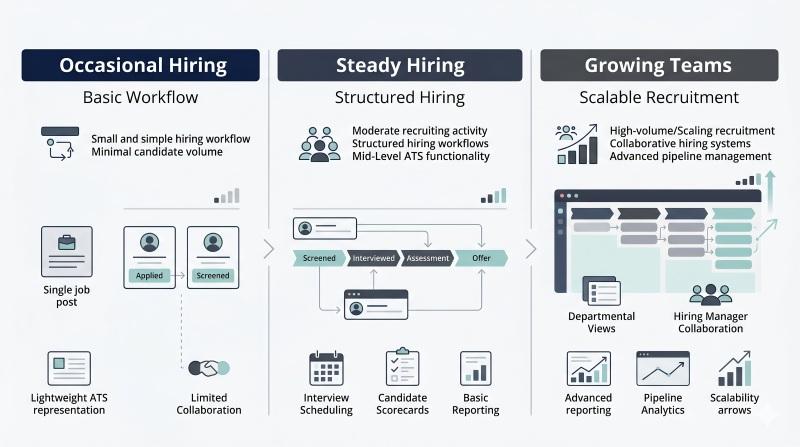
One active job or occasional hiring
Priorities:
- Fast job posting
- Basic applicant tracking
- Scheduling interviews and templates
- A sensible free plan or low-cost tier if you hire rarely
Avoid:
- Heavy customization projects
- Feature sprawl that requires a dedicated admin
Steady hiring (multiple roles per year)
Priorities:
- Strong hiring pipelines and collaboration for hiring teams
- Reporting tools to spot bottlenecks
- Candidate sourcing support and job board distribution
- Clear permissions for hiring managers and internal teams
Growing teams
Priorities:
- Workflow automation
- Customizable workflows that scale across roles
- Integrations that prevent silos
- Unlimited users (or pricing that does not punish collaboration)
- Strong candidate evaluation and structured hiring decisions
- Enables lean teams to compete for top talent without needing a dedicated HR department, especially for founders and CEOs focused on long-term team fit
Pricing and ROI for small business recruiting
Pricing is where tools quietly become expensive.
Free plan vs paid plans
A free plan can work if:
- You have low volume
- You need basic applicant tracking
- You can tolerate limits (one active job, limited integrations, limited automation tools) while still benefiting from scalable, science-based pricing plans
Paid plans are justified when:
- You need multiple job boards posting
- You need reporting tools and workflow automation
- You need integrations with payroll and HR systems
Per-user vs per-job pricing
- Per-user pricing punishes collaboration if you have many hiring managers, particularly when you are building high-performing sales teams and future sales leaders.
- Per-job pricing can get expensive if you have multiple roles open.
- Tiered models often hide key features (reporting tools, integrations) behind higher tiers.
ROI logic that holds up
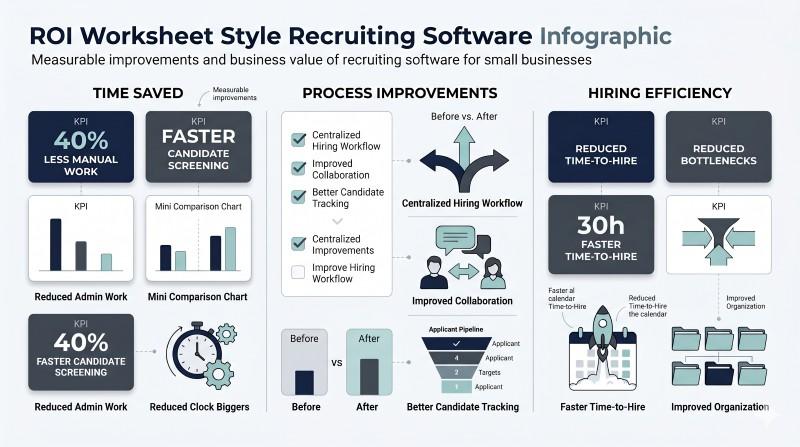
Your ROI usually comes from:
- Reduced manual effort (less scheduling, less back-and-forth, fewer lost candidates)
- Faster time to hire (roles filled sooner, less productivity drag)
- Better hiring decisions (fewer mis-hires, less churn, better team performance)
If the tool does not measurably improve at least two of those, it is not the right tool.
Quick vendor shortlist (examples) and what each is best for
Keep the shortlist small. You are not building a software museum.
When evaluating small business recruitment software, note that mobile apps are a critical feature for small business owners who need to manage recruiting on the go—especially when attending job fairs or conducting in-person recruiting activities, and that any integrated assessments should offer psychometrically precise hiring data.
Use these buckets when you shortlist options:
- ATS-focused tools: Best if you already have HR software and need recruiting strength.
- All-in-one hiring platforms: Best if you want one platform and simple processes.
- HR suite add-ons: Best if you are payroll-first and want hiring inside your HR stack.
Example: Zoho Recruit often appeals to small companies that want a configurable ATS inside a broader tool ecosystem. Whether it fits depends less on brand and more on your workflow, integrations, and reporting needs.
Also consider sourcing ecosystems: if your candidate sourcing depends heavily on LinkedIn, the practical workflow between your ATS and LinkedIn Recruiter matters more than marketing claims.
As a final note, developing AI skills is becoming increasingly important for small businesses looking to enhance their recruitment operations and for leaders who want data-backed behavioral coaching tools alongside their hiring stack.
Implementation checklist (30 days, not 6 months)
This is what a realistic setup looks like in a lean team.
- Clean your candidate data
- Consolidate duplicates
- Decide what you will keep and what you will archive
- Set up a minimum viable pipeline
- 5–7 stages max
- One clear owner per stage
- Create templates that remove repeat work
- Outreach messages
- Rejection emails
- Interview invites
- Offer letter templates
- Connect the integrations that matter, and consider adding tools that provide risk alerts for turnover and team fit
- Email + calendar (Outlook/Google)
- Background checks (if needed)
- Payroll integration / HRIS handoff
- Train hiring teams on one workflow
- How to review candidates
- How to use scorecards
- How to move candidates through stages
- Pilot on one role first, paying attention to motivation insights and what drives new hires
- One active job
- Fix friction points before scaling

FAQ
What is the best recruiting software for small business?
The best recruiting software is the one your team will actually use weekly. Prioritize job posting, applicant tracking, interview scheduling, and basic reporting first. Then decide based on integrations and pricing model.
Do I need an applicant tracking system if I’m only hiring occasionally?
If your process is currently email and spreadsheets, even an entry-level ATS can pay off by reducing manual effort, improving candidate experience, and keeping candidate data organized. If you truly hire once a year, a light tool or a constrained free plan may be enough.
Can recruiting software post jobs to multiple job boards?
Many recruiting platforms can post to multiple job boards from one workflow. The real test is whether it tracks results by source and keeps job edits and reposting simple.
What should recruiting software integrate with?
At minimum: email and calendar. If you already run payroll and HR systems, require a clean handoff into onboarding and employee records. Add background checks and e-signature only if they fit your roles and compliance needs.
How do I measure success after implementation?
Track time to hire, stage conversion rates, source quality, and candidate drop-off. If those do not improve, the workflow or tool setup needs adjustment.
Conclusion: choose the right stack and reduce hiring risk
Small business hiring software should do three things: reduce manual effort, shorten time to hire, and improve hiring decisions with better structure.
A practical decision framework:
- Pick the right category: ATS vs HR software vs all-in-one
- Require the features that remove friction: job posting, pipelines, scheduling, evaluation, reporting
- Validate integrations early: calendar, email, payroll and HR systems
- Choose pricing that matches how you hire: per-user vs per-job
- Implement fast: one role, one workflow, then scale
If you want to add more confidence to hiring decisions, the missing piece is usually structured candidate data, not another round of “panel impressions.” If you want to see how OAD performs on your roles and candidates, you can test OAD and compare hiring decisions with data instead of gut feel.