Hiring your first employee or your fifteenth can make or break your small business. But most owners approach hiring with gut instinct and guesswork, not a system. In this guide, you’ll learn how to hire employees for a small business using a smarter, science-backed approach that saves time, reduces risk, and builds a team that actually fits.
How to Hire Employees for a Small Business: Understanding the Legal Requirements
Hiring your first employee isn’t as simple as picking someone and handing them a paycheck. Before you even post the job, you need to ensure your business is legally set up to hire. Skipping this step can result in fines, delays, or even lawsuits—and for small businesses, those mistakes can be costly. Employers must understand all legal requirements before they hire employees to ensure compliance and avoid penalties.
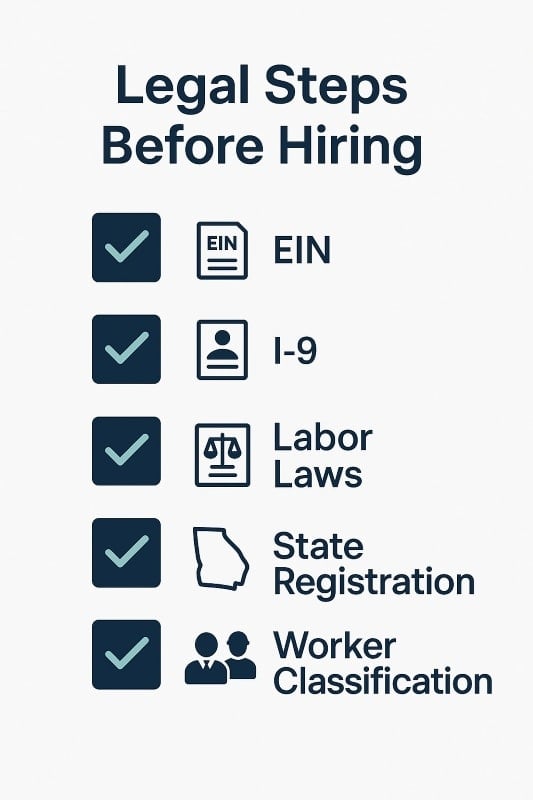
Start by applying for an Employer Identification Number (EIN) through the IRS. This is essentially your business’s Social Security number and is required for tax filings, payroll, and reporting to the federal government. Then, register with your state’s labor department, which may require additional paperwork depending on where your business is based.
You’ll also need to understand your obligations under federal labor laws (like the Fair Labor Standards Act) and your state’s employment laws. These cover everything from minimum wage and overtime rules to mandated breaks and youth labor restrictions.
Next, employers must verify the employee’s eligibility to work in the U.S. by completing Form I-9. This involves reviewing valid documentation for id and employment authorization, such as a driver’s license and Social Security card, to confirm the employee’s identity and work authorization. Employers are responsible for ensuring the employee’s eligibility, keeping records of the employee’s documentation, and using the E-Verify program if required in your state. Misclassifying someone or failing to verify their authorization can trigger penalties from both the IRS and the Department of Homeland Security.
Finally, be crystal clear on the difference between a W-2 employee and an independent contractor. Misclassifying roles to avoid paying payroll taxes or offering benefits can put your business at legal risk—and it’s one of the most common mistakes small businesses make when hiring.
EIN: Your First Legal Step Toward Hiring
Before you can legally hire or pay employees, your business needs an Employer Identification Number (EIN)—think of it as your company’s federal ID. The IRS uses this number to track payroll taxes, income tax withholdings, and employment-related filings. Without it, you can’t run payroll, withhold federal income tax, or submit new hire reports.
Fortunately, the process is simple. You can apply for an EIN online through the IRS website and receive it instantly in most cases. It’s also possible to apply by phone or mail using Form SS-4, though that may take longer. Once secured, your EIN unlocks a series of critical functions:
- It allows you to open a business bank account
- File federal and state payroll taxes
- And stay compliant with both IRS and federal labor laws
If you’re serious about hiring the right people—and doing it legally—this is the box you check first. It sets the foundation for everything else, from withholding taxes to issuing paychecks and handling benefits.
Employee or Contractor? Why Classification Matters
One of the most overlooked legal risks in small business hiring is misclassifying a new hire. Before you onboard anyone, you need to determine whether they’re a W-2 employee or an independent contractor—because the difference has serious tax and legal implications.
Employees work under your direct supervision. You control their schedule, tools, and deliverables. In return, you’re responsible for payroll taxes, tax withholdings, and compliance with both federal and state employment laws. They’re also typically eligible for benefits like workers’ compensation insurance and unemployment coverage.
Independent contractors, by contrast, operate as their own business. They invoice you for work performed, pay their own taxes, and aren’t subject to the same withholding rules. You’re not required to provide benefits or report their earnings beyond issuing a 1099 form if they meet the income threshold.
Misclassification is a red flag for the federal government, and it’s one of the most common compliance issues small businesses face. Penalties can include back taxes, interest, and even legal action. To stay on the right side of the law, review the IRS’s classification guidelines and check your state’s labor department for additional rules.
Getting this right from the start protects your business, streamlines your hiring process, and keeps you compliant as you grow.
Workers’ Compensation: Protect Your People—and Your Business
If you’re hiring employees, you’re likely required to carry workers’ compensation insurance—and skipping it can cost you far more than the premium.
In most states, workers’ comp is legally required the moment you bring on your first employee. It provides financial support in case of injury or illness due to workplace exposure, covering medical costs and lost wages while shielding your business from personal liability.
Most small businesses get coverage through a private insurance carrier, though some states allow you to operate on a self-insured basis—if you meet strict financial and compliance standards. The exact rules vary by state and industry, so it’s critical to check with your state’s labor department for specific guidance.
Compliance goes beyond purchasing a policy. You’ll need to:
- Post required notices in a visible location
- Keep accurate records of incidents
- Report injuries promptly to the appropriate agency or insurer
But this isn’t just about following the law. Offering workers’ comp signals to qualified candidates that you take safety seriously. It builds trust, enhances your employer brand, and protects your team—and your bottom line—when the unexpected happens.
Write a Role-Specific, High-Impact Job Description
A generic job description might get you applicants—but not the right candidates for your jobs. If your posting could apply to a dozen other businesses, you’re going to attract mismatched candidates who don’t understand your mission or expectations. Targeting the right candidates ensures your jobs attract people who are truly suited for your company’s needs.
Instead, think of your job description as a strategic tool. Start by clearly outlining the job responsibilities and how they connect to your business goals. What will success look like in this role 30, 60, or 90 days in? Spell it out.
Then, shift from listing tasks to selling the opportunity. Include why the role matters, the impact they’ll have, and the kind of team they’ll be joining. A compelling job description encourages potential candidates to apply for your jobs and helps you attract the right candidates. Today’s candidates—especially high performers—want to feel aligned with a mission. Use language that reflects your company values and the culture they’ll be stepping into.
If you’re unsure what type of person will thrive in the role, behavioral tools like OAD’s pre-employment assessments can help you define the key traits that predict performance in your unique business environment.
And finally, be specific about compensation, benefits, and growth potential. Vague postings create confusion and waste time. The more clarity you offer up front, the better your candidate pool will be.
Choose Where to Post Your Job Strategically
Posting your job in the right place is just as important as writing the right job description. Too many small businesses default to one platform and hope for the best—but that’s like fishing in the wrong pond. Actively post jobs on multiple platforms to reach a wider audience and attract more qualified candidates.
Start with well-known job boards like Indeed, LinkedIn, and ZipRecruiter. These platforms offer broad reach and filtering tools to help you target qualified candidates, especially if your role is remote or hybrid.
But don’t stop there. Explore industry-specific job sites, local business networks, alumni groups, and even Facebook groups for your niche. These smaller, more focused channels often attract highly motivated candidates who are already aligned with your field.
Another overlooked but highly effective tactic? Referrals. Your current team likely knows people with a similar work ethic and mindset. Encourage them to post jobs within their own networks, which can significantly increase the number of job applications from qualified candidates. Consider offering referral bonuses for any hires that stick.
Want to go even deeper? Behavioral data from tools like OAD can help you identify not just who applies—but who’s most likely to succeed. That means fewer wasted interviews and more time talking to the right people.
Pre-Employment Screening and Background Checks
Finding someone with the right resume is only half the battle. You need to know if they’re trustworthy, aligned with your company values, and capable of growing with your business. That’s where pre-employment screening comes in.
Start with the basics: conduct a background check to verify employment history, education, and any red flags related to criminal or financial records. Depending on your industry, this may be a legal requirement.
But here’s where most small businesses stop—right before the most valuable insight.
Traditional resumes and background checks tell you what a candidate has done. But they don’t reveal how they think, solve problems, or respond under pressure. That’s why behavioral assessments—like those provided by OAD—are critical. These tools give you objective data on whether someone’s personality traits align with the demands of the role and your company culture.
For example, if you need someone who can handle ambiguity and make independent decisions, you don’t just want to ask about past experience—you want to assess how their traits support those behaviors. With this kind of insight, you can hire qualified candidates who are not just capable but deeply compatible.
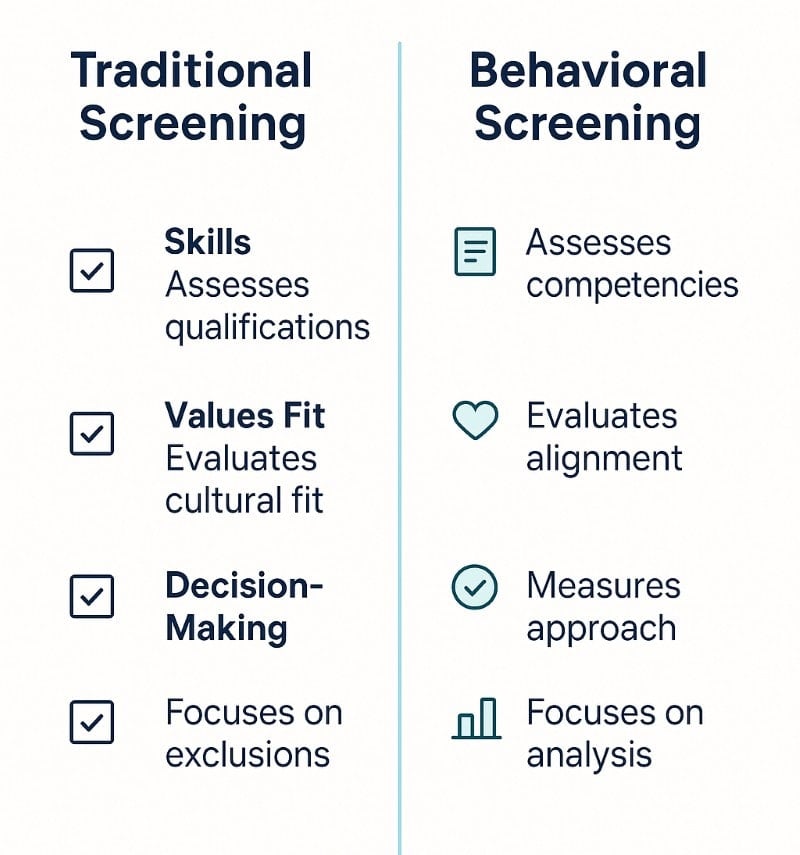
Finally, always check employment authorization and required documentation. This includes verifying Social Security numbers, reviewing valid IDs like a driver’s license, and confirming eligibility through programs like E-Verify.
Master the Interview Process
Too many interviews feel like casual conversations or rehearsed performances. You ask standard questions. They give polished answers. Everyone smiles—and two weeks later, you’re wondering if you made a mistake.
To avoid costly mis-hires, structure your interview process to go deeper. Every question should uncover traits, values, and decision-making patterns—not just surface-level experience.
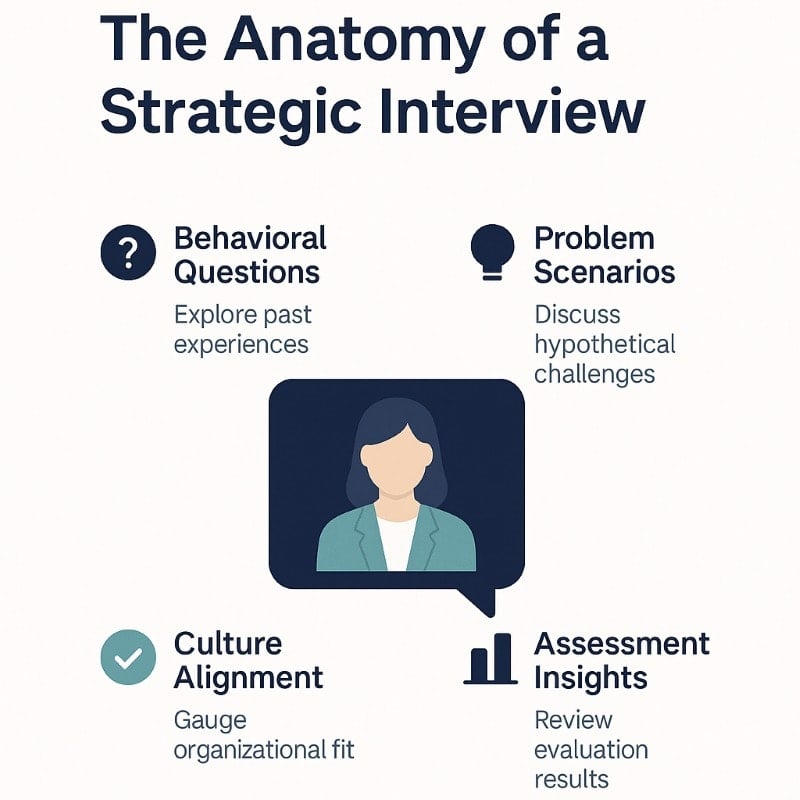
Start with behavioral interview questions. These focus on how a potential employee has responded to real challenges in the past. For example:
“Tell me about a time you had to manage conflicting deadlines. What did you prioritize, and why?”
Next, include a problem-solving scenario that reflects your business reality. Don’t just test knowledge—observe how they think under pressure. Give them a real task or situation they’d face in the role and see how they approach it.
You should also evaluate culture and values fit. That doesn’t mean hiring someone just because they’re likable. It means assessing whether their work style, communication preferences, and decision-making align with your team’s operating norms. OAD’s assessment data can add depth here by showing if a candidate is naturally suited to your environment—or if you’d be asking them to fight against their instincts every day.
And here’s your golden rule: never settle. A “maybe” in the interview becomes a liability on the job. Keep your standards high and your process consistent.
Offer Competitive Compensation and Benefits
You don’t need to match corporate salaries to attract great talent—but you do need to offer a package that feels fair, transparent, and growth-oriented.
Start by benchmarking salaries in your region and industry. Tools like Payscale or the Bureau of Labor Statistics can help you get a sense of market rates. Then clearly outline the compensation in your job offer—don’t leave candidates guessing.
Next, factor in both legally required and optional employee benefits. On the required side, you’ll need to handle:
- Payroll taxes
- Workers’ compensation insurance
- Unemployment insurance
- Contributions to Social Security
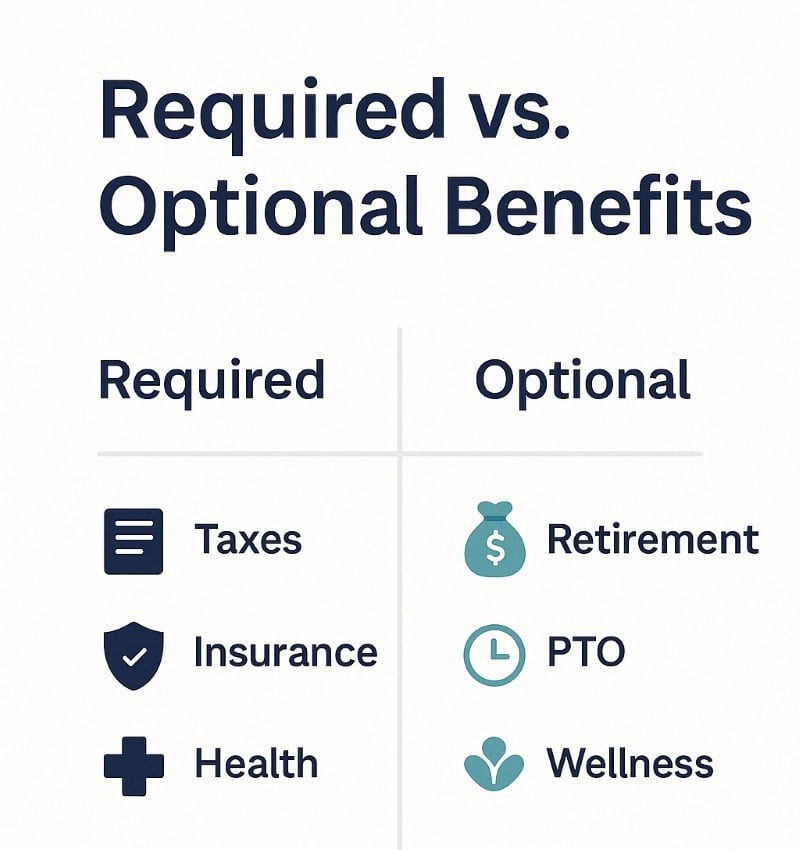
These obligations vary by state and business structure, so always check with your accountant or payroll provider to stay compliant.
Beyond the basics, small perks can go a long way in setting you apart. Offering health insurance, retirement plans, or flexible hours—even on a small scale—signals that you value your team’s well-being. If you’re scaling fast, consider using benefits administration software to streamline enrollments, tracking, and compliance.
And here’s something most small businesses overlook: communicate the total value of your offer. That includes taxes you cover, healthcare contributions, paid time off, and any other benefits. When candidates see the full picture, they’re more likely to say yes—and stay.
Handle Tax Withholdings and Payroll Setup
Once you’ve hired your employee, it’s time to get their paycheck right—and the government expects you to get it right from day one. Accurately calculating tax withholdings is essential when paying employees, as it ensures compliance with federal and state laws and prevents costly mistakes.
First, choose a payroll method that works for your business. Many small businesses use an external payroll service to handle calculations, filings, and deposits. This reduces errors and helps ensure you’re meeting federal and state requirements.
You’ll need to calculate tax withholdings accurately, which includes:
- Federal income tax
- State taxes
- Social Security and Medicare contributions
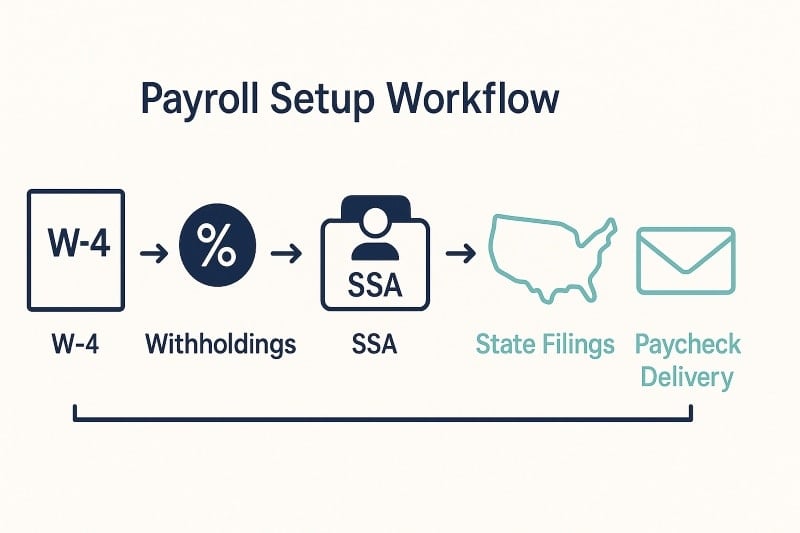
Calculating tax withholdings correctly is a critical part of paying employees and managing payroll taxes.
Employees must complete Form W-4 so you know how much to withhold. You’ll also submit tax forms to the Social Security Administration and your state’s labor and tax departments. Keep meticulous records for tax purposes—especially when it’s time to file quarterly tax returns. Errors in calculating tax withholdings can directly affect the accuracy of the employee’s paycheck, leading to compliance issues and employee dissatisfaction.
And don’t forget new hire reporting. Most states require you to add your new employee to a state directory, often within 20 days of the hire date. This ensures compliance with federal programs, including child support enforcement.
Getting this right isn’t just about compliance—it builds trust. A single error on an employee’s paycheck can create lasting doubt about your professionalism. So if you’re unsure, invest in help. It’s cheaper than cleaning up mistakes later.
Complete New Hire Paperwork and Compliance Steps
Hiring someone isn’t official until the paperwork is done—and skipping a single form can trigger fines or delays. Here’s what to check off your list.
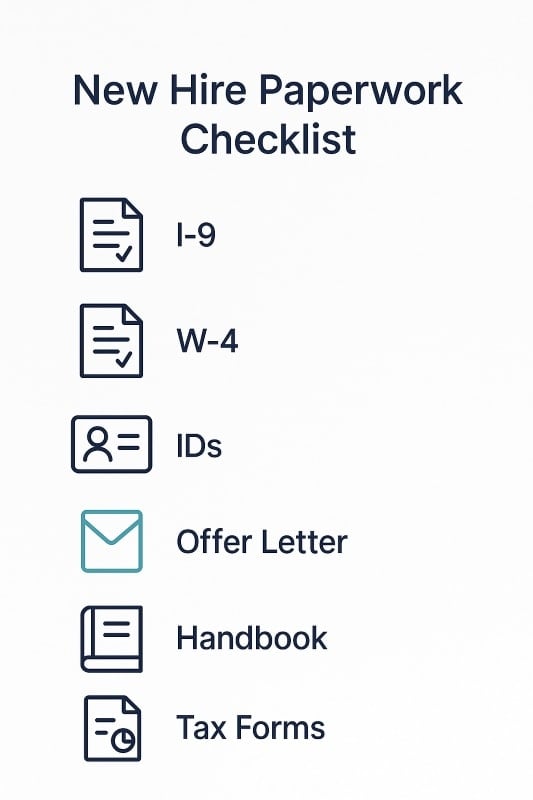
First, every employee must complete Form I-9 to verify their identity and employment authorization. You’ll need to review original documents—like a driver’s license, Social Security card, or U.S. passport—and keep the completed I-9 on file for at least three years.
Next, collect Form W-4 so you can determine how much federal income tax to withhold from their paycheck. Many states also require a separate state tax form, so check with your state’s labor department for exact requirements.
Once the basics are filed, report your new hire to your state’s new hire reporting directory. Employers are legally required to report new hires to the state’s labor department, and in some cases, to human services agencies for child support enforcement and compliance with federal and state laws. This is often a simple online submission and must be done within a specific window (usually 20 days after the hire date).
You should also create a secure digital or physical employee file that includes:
- Identification documents
- Tax forms
- Job application and offer letter
- Emergency contact info
- Signed policies or agreements (e.g., NDAs or handbooks)
Finally, if you’re using a payroll service or HR platform, make sure everything is synced correctly. Missing a checkbox in your system can lead to incorrect tax withholding or missed reports.
This step may feel administrative—but it protects both you and your employee. It also signals professionalism from day one, which boosts trust and sets the tone for accountability.
Create a Strong Employee Handbook
A handshake and job title aren’t enough. To build a stable, high-performing team, you need to clearly communicate how your business operates—and that starts with a solid employee handbook.
Your handbook sets the tone for your company culture and expectations. It should include:
- Your mission and core values
- Code of conduct and workplace behavior
- Work hours, attendance, and time-off policies
- Guidelines for safety and workplace exposure
- How to access employee benefits and file concerns
- Use of technology and data security expectations
- Anti-discrimination and harassment policies
- Disciplinary procedures and grievance channels
Even if your business is small, a handbook helps inform employees in writing and protects you from future misunderstandings or legal disputes. It creates consistency, especially as your team grows.
Keep it professional—but not cold. Let the tone reflect your leadership style and company culture. Some companies also include a welcome note or founder’s message to personalize the experience.
Not sure where to start? Many HR platforms offer customizable templates, or you can consult your state’s labor site for specific guidance to stay compliant.
And remember: a handbook isn’t a “set it and forget it” document. Review and update it regularly—especially if you introduce new tools, policies, or benefit programs.
Make Onboarding a Retention Tool
You only get one chance to make a first impression—and in business, that impression often happens during onboarding. If your process feels rushed or reactive, your new hire will sense it. And that can impact motivation, trust, and retention from day one.
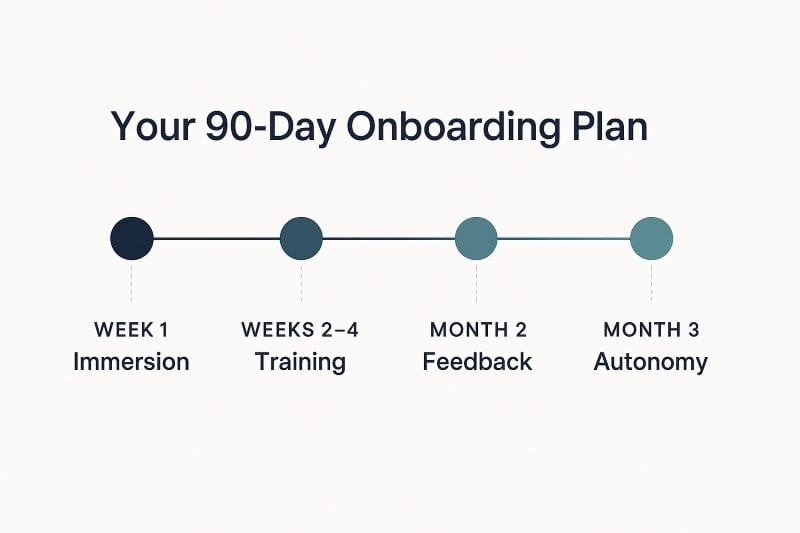
Instead, treat onboarding as a 90-day experience that gradually immerses your new employee into the company’s systems, values, and expectations. Start with a structured plan that outlines:
- Clear milestones for weeks 1, 2, and 4
- What success looks like in the first 30–60–90 days
- Who they can go to for questions or support
- When and how feedback will be given
Make it personal. Introduce them to your team with intention—not just a quick wave on Slack or a group email. Give them a mentor or onboarding buddy, and walk them through your culture, workflows, and values.
Reinforce key policies from your employee handbook, and show them how their role connects to the broader mission. Let them see the impact they can make, early and often.
And don’t forget about documentation. Track their progress, share expectations in writing, and be proactive with early feedback. It’s much easier to correct misalignment at week two than at month six.
When onboarding is done right, your new hire doesn’t just feel welcome—they feel capable, confident, and committed.
Monitor and Evaluate Your First Employee’s Progress
Hiring doesn’t end on the start date—it begins there. To get a return on your hiring investment, you need to actively manage, support, and refine your new hire’s experience.
Set clear check-in points during the first 90 days. These don’t have to be formal reviews—but they do need to happen consistently. Ask:
- What’s going well?
- Where are they feeling stuck?
- Do they understand how success is measured?
- Are they receiving the right tools and support?
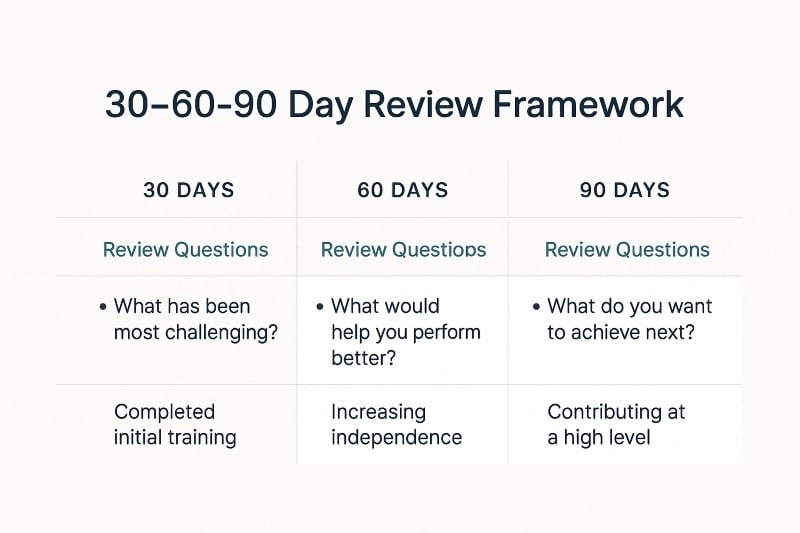
Pay attention to early signs of misalignment. Is your first employee showing initiative? Are they hitting basic performance goals? If not, act quickly—don’t wait until the probation period ends to adjust expectations or offer training.
This is also your chance to inform employees of any changes in responsibilities, priorities, or workflows. Keep the communication open and two-way. You want your new hire to feel safe offering feedback—not just receiving it.
Use this time to revisit the job application and original expectations. If something isn’t working, course-correct early. The more intentional you are now, the more scalable your systems will be when you grow from one employee to ten.
How OAD Helps Small Businesses Hire Smarter
Hiring doesn’t have to be a guessing game. With the right tools, small businesses can make hiring just as data-driven and strategic as any Fortune 500 company.
That’s where OAD comes in.
OAD’s scientifically validated behavioral assessment gives you deep insight into a candidate’s personality, motivation, and work style—before you make the hire. It helps you:
- Predict culture fit and reduce early turnover
- Align candidates with role expectations
- Save time by focusing only on top-fit applicants
- Avoid costly mis-hires based on gut feeling alone
Whether you’re making your first hire or expanding your team, OAD helps you choose people who will grow with your business—not just fill a seat.
Want to hire with more confidence and less risk?
Start with the Top Performer Profile and see how OAD’s science-backed platform helps small businesses build high-performing teams from the start.